HD Streamz APK: Free Live TV Streaming for Android
Watch 1,000+ live TV channels, sports, and movies on your Android device. HD Streamz is a free streaming app supporting English, Hindi, Bengali, Urdu, and Arabic channels across news, sports, and entertainment.
Latest version compatible with Android 5.0 and above. Lightweight install, no subscription required, and regular channel updates.
Download Latest Version
What Is HD Streamz?
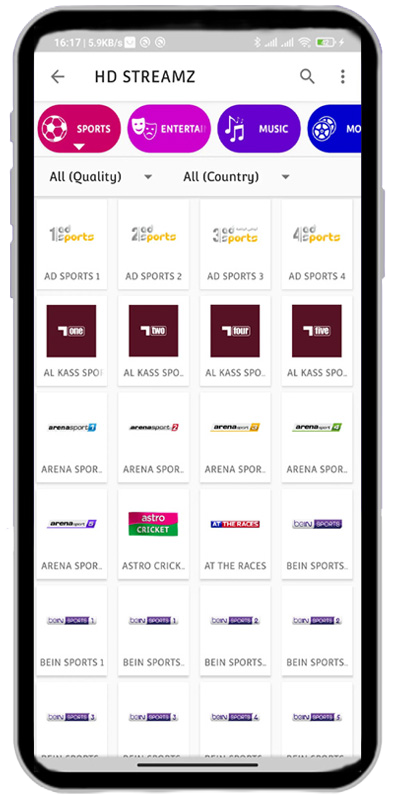
HD Streamz is a free Android streaming app that aggregates over 1,000 live TV channels, sports broadcasts, and on-demand video into a single interface. The app supports channels in English, Hindi, Bengali, Urdu, Arabic, Turkish, and more — covering news, sports, movies, and entertainment across South Asia, the Middle East, the UK, and the US.
Channel Coverage by Region
The app organises channels by country and language, so you can quickly find local broadcasts whether you are watching Star Plus from India, ARY Digital from Pakistan, BBC from the UK, or beIN Sports from the Middle East. Regional packs include South Asia, MENA, Turkey, North America, and Europe, with new channels added in regular updates.
Built for Reliable Streaming
Each channel is served through multiple stream links, so when one source goes offline you can switch to a backup without leaving the player. HD Streamz also integrates with external players including MX Player, VLC, and Web Video Cast, giving you full control over playback quality, subtitles, and Chromecast support.
Who HD Streamz Is For
The app is built for cord-cutters, expatriates who want channels from home, and sports fans tracking matches across leagues. There is no account, no subscription, and no payment — the app is funded by lightweight advertising between channel switches.
HD Streamz Features
Built for Android users who want a single app for live TV, sports, radio, and on-demand video, HD Streamz combines a deep channel library with flexible playback options and a lightweight, account-free setup.
1,000+ Live TV Channels
Stream over a thousand live television channels spanning news, sports, entertainment, kids, and regional programming. The library covers South Asian, Middle Eastern, European, and US broadcasts, with channel packs organised by country and language.
Live TV and IPTV Streaming
Watch real-time broadcasts of cricket matches, football leagues, news bulletins, and entertainment shows. The app uses standard IPTV streaming protocols, so live events play with minimal buffering on stable connections.
Built-In Live Radio
Tune in to FM and online radio stations from across the world for music, talk shows, religious programming, and breaking news — all from inside the same app, without a separate radio downloader.
Multiple Stream Links per Channel
Each channel is served through several backup links. If one stream goes offline or buffers, switch to an alternate source in a single tap — no app restart, no losing your place in a live broadcast.
External Player Support
Compatible with MX Player, VLC, XPlayer, and Web Video Cast. Use your preferred player for advanced subtitle handling, audio-track switching, hardware decoding, and Chromecast or smart TV mirroring.
HD Playback Quality
Channels stream in SD, HD, and Full HD where the source supports it. Picture quality adapts to your network speed, and external player support unlocks higher bitrates and 1080p playback on capable hardware.
Watch From Anywhere
The app works wherever your Android device has an internet connection — useful for travellers, expatriates following hometown broadcasts, and sports fans tracking matches in different time zones.
Free, No Account Required
HD Streamz is free to install and use. There is no signup, no subscription, no credit card, and no premium tier. The app is supported by lightweight ads between channel switches, which keeps the service free for users.
Lightweight and Data-Efficient
The APK installer is small and runs smoothly on entry-level Android phones with 2 GB of RAM and above. Streaming bitrates are tuned for mobile data, so you can watch on cellular without burning through your data plan.
Regularly Updated Channel List
Stream sources are refreshed frequently to replace dead links, add new channels, and adjust to broadcaster changes. App updates also bring player improvements, bug fixes, and compatibility with the latest Android versions.
Search and Category Filters
Find channels quickly using the in-app search bar or browse by category — sports, news, movies, music, kids, religious — and by country. Favourites can be pinned for one-tap access to the channels you watch most.
Android Phone, Tablet, and TV Compatible
Runs on Android 5.0 and above, including phones, tablets, Android TV boxes, and Fire TV devices via sideload. Cast to a larger screen using the Chromecast and DLNA support built into compatible external players.
HD Streamz vs Other Free Streaming Apps
Free Android streaming apps have come and gone over the past few years. Mobdro shut down in 2021 after legal action, ThopTV stopped receiving updates the same year, and OreoTV remains active but with a smaller channel library. Here is how HD Streamz compares to the alternatives most users still search for.
| Feature | HD Streamz | Mobdro | ThopTV | OreoTV |
|---|---|---|---|---|
| Currently active | Yes, updated regularly | No, shut down 2021 | No, abandoned 2021 | Yes, smaller team |
| Live TV channels | 1,000+ | ~500 at peak | ~800 at peak | ~600 |
| Live radio | Yes, built-in | No | No | Limited |
| Backup stream links | Multiple per channel | Single source | Single source | Limited backups |
| External player support | MX, VLC, XPlayer, Web Video Cast | Internal only | MX, VLC | MX, VLC |
| Android TV / Fire TV | Yes, via sideload | Yes, when active | Yes, when active | Yes |
| Account required | No | No | No | No |
| Minimum Android version | Android 5.0 | Android 4.1 | Android 4.4 | Android 5.0 |
HD Streamz vs Mobdro
Mobdro was one of the most popular free streaming apps until it was shut down in February 2021 following legal proceedings in Spain. The original Mobdro APK no longer receives updates, and the streams stopped working shortly after shutdown. Many APKs labelled “Mobdro 2024” or “Mobdro new version” floating around download sites are repackaged clones, not the original app. HD Streamz is the closest active replacement, with a similar channel mix across South Asia, the UK, and the US, and an actively maintained stream list.
HD Streamz vs ThopTV
ThopTV had a strong following in India for cricket and Bollywood content before its developer was arrested in 2021 and the app was discontinued. Existing ThopTV installs continued working for a while but most streams are now dead. HD Streamz covers similar ground for Indian and Pakistani channels — Star Plus, Sony, ARY, Geo, PTV — and adds Middle Eastern, Turkish, and Western channels that ThopTV did not focus on.
HD Streamz vs OreoTV
OreoTV is still active and the closest current competitor to HD Streamz. The two apps overlap significantly on free Indian and South Asian channels. The main practical differences: HD Streamz has a deeper channel library and more reliable backup links, while OreoTV ships a built-in IMDB-style movie catalogue that HD Streamz does not. If you primarily want live TV and sports, HD Streamz tends to be the more reliable pick. If you want on-demand movies bundled with live TV, OreoTV is worth trying alongside it.
HD Streamz vs Paid Services
HD Streamz is not a replacement for licensed services like Netflix, Disney+ Hotstar, or ESPN+ if you want guaranteed uptime, original content, and 4K streaming. What it offers instead is a free, no-account way to access live broadcast TV from multiple regions in a single app — useful as a supplement to paid subscriptions, especially for international channels that paid services do not carry in your country.
How to Download and Install HD Streamz APK on Android
HD Streamz is not available on the Google Play Store, so installing it requires sideloading the APK file. The full process takes about two minutes on most Android phones, tablets, and Android TV devices. Follow the steps below in order.
-
Allow installs from unknown sources
On Android 8.0 and newer, open Settings → Apps → Special access → Install unknown apps, then select your browser (usually Chrome) and toggle Allow from this source on. On Android 7.0 and older, the option is under Settings → Security → Unknown sources. This permission lets your phone install apps that are not from the Play Store.
-
Download the HD Streamz APK
Tap the download button below to save the latest HD Streamz APK to your device. The file is around 25 MB and will land in your Downloads folder. If your browser shows a warning that the file type can harm your device, tap Download anyway — this warning appears for all APK files installed outside the Play Store.
-
Open the APK file to install
Open your file manager or the Downloads notification, and tap HDStreamz.apk. Android will show the list of permissions the app requests — review them and tap Install. The install takes 10–15 seconds. If a Play Protect warning appears, tap Install anyway to continue.
-
Open HD Streamz and accept the disclaimer
Find the HD Streamz icon in your app drawer and tap to launch. On first run the app shows a brief disclaimer about third-party stream sources — tap Accept to continue. The app does not ask for an account, email address, or payment details.
-
Set an external player (recommended)
For the best playback quality, install MX Player or VLC from the Play Store before streaming. When you open a channel in HD Streamz, choose your external player from the prompt — this gives you smoother playback, hardware decoding, and Chromecast support compared with the built-in player.
-
Browse channels and start watching
Tap the country or category filters at the top to narrow the channel list, or use the search icon to find a specific channel. Long-press any channel to mark it as a favourite for one-tap access later. If a stream does not load, tap the channel again and choose an alternate link from the list of backup sources.
HD Streamz FAQs
Common questions about installing, using, and troubleshooting the HD Streamz APK on Android phones, tablets, and TV devices.
What is HD Streamz?
HD Streamz is a free Android app that streams over 1,000 live TV channels and radio stations from around the world. It covers news, sports, movies, and entertainment in multiple languages including English, Hindi, Bengali, Urdu, Arabic, and Turkish. The app is not on the Google Play Store and is installed by sideloading the APK file.
Is HD Streamz free to use?
Yes. HD Streamz is completely free, with no subscription, no signup, and no payment information required. The app is supported by lightweight ads that appear between channel switches, which is how the service stays free for users.
Is HD Streamz safe to install?
The APK file from the official source is widely used and does not contain malware, but Android will show a Play Protect warning during install because the app is sideloaded rather than from the Play Store. To stay safe, only download the APK from a trusted source, scan the file with a tool like VirusTotal if you want extra confirmation, and avoid third-party clones with names like “HD Streamz Pro” or “HD Streamz Plus” that are not official builds.
Is HD Streamz legal?
HD Streamz itself is an aggregator app — it does not host content, but rather embeds publicly available stream links. The legality of watching specific channels through it depends on the licensing of the underlying streams and the laws of your country. Some streams in the app are official free-to-air feeds; others may not be officially licensed for redistribution. Users are responsible for understanding the rules in their region.
Which Android version do I need?
HD Streamz works on Android 5.0 (Lollipop) and above. It runs on phones, tablets, Android TV boxes, and Fire TV devices via sideload. The APK is around 25 MB and runs smoothly on entry-level hardware with 2 GB of RAM.
Does HD Streamz work on iOS or Windows?
No. HD Streamz is an Android-only app and is not available for iPhone, iPad, or Windows PC. There is no official iOS version. To run it on a Windows computer, you would need an Android emulator like BlueStacks or LDPlayer, which can install APK files inside a virtualised Android environment.
Can I watch HD Streamz on Fire TV or Android TV?
Yes. On Fire TV, install the Downloader app from the Amazon Appstore, enter the APK URL, and install. On Android TV, use the Send Files to TV or Downloader app to sideload the APK. The same six-step install process applies, with a TV remote instead of a touchscreen.
Why are some channels not loading?
Stream sources go offline regularly — broadcasters change links, servers go down, or geographic restrictions kick in. HD Streamz provides multiple backup links per channel, so when one stream fails, tap the channel again and choose an alternate source from the list. If all links fail, the channel is likely temporarily unavailable across all sources and usually returns within a few hours.
Which external player works best with HD Streamz?
MX Player and VLC both work well. MX Player tends to give smoother playback and better hardware decoding on most phones, while VLC has stronger subtitle and codec support. For casting to a TV, Web Video Cast adds Chromecast and DLNA support that the built-in player does not have.
How much data does HD Streamz use?
SD streams use roughly 0.5–0.7 GB per hour, HD streams use 1.5–2 GB per hour, and Full HD streams can use 3 GB or more per hour. If you are on mobile data, set your external player to a lower quality or stick with SD channels to keep usage manageable.
Does HD Streamz support Chromecast?
Not directly through the built-in player. To cast HD Streamz to a Chromecast or smart TV, open the channel in Web Video Cast as the external player — it adds full Chromecast and DLNA support so you can mirror the stream to any compatible TV on the same Wi-Fi network.
How do I update HD Streamz to the latest version?
The app does not auto-update because it is not on the Play Store. To update, download the latest APK from the official source and install it over the existing app — your favourites and settings are preserved. Check the download page every few months for new releases that add channels and fix dead stream links.
HD Streamz: The Quick Summary
HD Streamz is a free Android streaming app that delivers 1,000+ live TV channels, sports broadcasts, and radio stations across South Asia, the Middle East, Europe, and the US. No account, no subscription, no payment — just download the APK, install in two minutes, and start watching. Compatible with phones, tablets, Android TV, and Fire TV.
Latest version · Updated regularly · Free for Android 5.0 and above
Disclaimer: HD Streamz is a third-party aggregator app and is not affiliated with Google Play. The app does not host any content; it organises publicly available stream links. Users are responsible for complying with the broadcasting and copyright laws in their region.